 How does your team show progress? Do they use activity-based (cost accounting) measures? Or, do they demo running, tested features? And possibly use a product backlog burnup chart to see each feature set’s relative progress? How can we understand the costs of this progress?
I am a big fan of demos and a product backlog burnup chart—if you need it. With enough demos, you might not even need any charts. That’s because demos build trust.
But no team can demo unless they implement by feature. That’s the image above. When people work as experts, they often experience delays until they can finish and demo anything at all, never mind a single finished feature.
As I said in Part 1 of this series, effective product development, especially for software, is an outcome of what the team learned. That means partial feature development where the team adds to inventory does not help their progress. Inventory raises costs. The longer the team waits for the other people to finish “their” work, the more the partially completed work ages.
What happens when work ages? It often loses value. Not just in the various costs of the Cost of Delay to the organization, but in what customers value. While some managers think they get to decide, the customers are the ultimate arbiter of value. Customers are often picky. That’s fine, because they are the only people who know what they want.
What Do Customers Want?
This is the ever-present question of effective product development. Producers think they know what customers want. More often, customers don’t know the whole story of their problems and what they want for solutions. I’m a reasonably typical customer, and here are my reasons for wanting a high-tech product:
- I have a specific problem to solve. That means I’m willing to search and find the “right” product for now. Producers need to realize that “for now” is not forever.
- Something about my current setup irritates me. That might be anything—a printer, a problem I think I should be able to solve with software, or an upcoming software change.
- A problem I don’t realize I have. Some blog or email pointed me to something interesting that I might want to consider.
These reasons mean I want to see what the producer offers now. And if I have to buy a subscription instead of the product outright, I want to know when I can expect another update.
That means I want to see finished, running, tested features as soon as the producer can offer them. Luckily, producers who manage with flow can offer me those new features faster than the ones who manage with cost accounting.
Manage With Flow
Flow focuses on lowering WIP (Work in Progress) and increasing throughput. (See How to Start Thinking in Flow Efficiency for Better Teamwork & Throughput for more specifics.) If you’re not sure how those dynamics work, read Flow Metrics and Why They Matter for Teams and Managers. That post explains this image in detail:
 The older the work, the more WIP the team has. That increases cycle time, the time it takes for a team to release their finished features. In turn, that lowers throughput, which increases aging. Around and around we go, not finishing much, and feeling worse and worse all the time.
However, there is a way to break this reinforcing feedback loop and make it a stabilizing feedback loop.
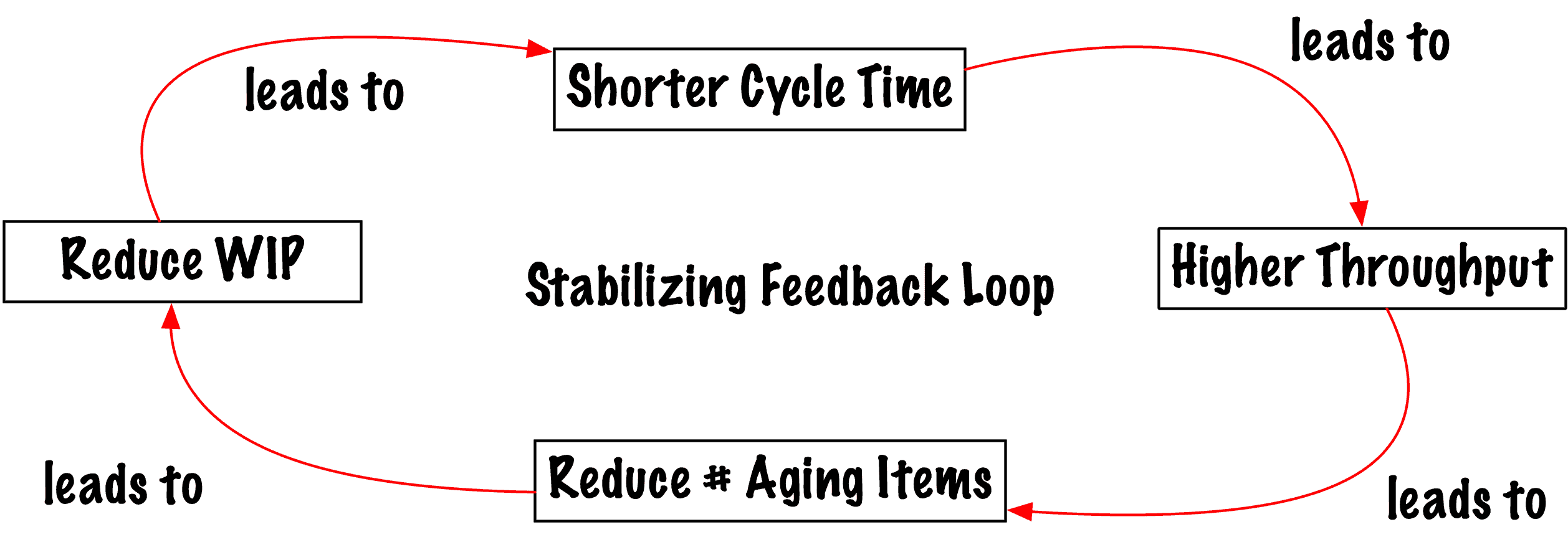
Many teams often start with reducing WIP. But the best place to “gain time” is to eliminate the work you don’t have to do. That’s why I recommend starting with aging. (See Create More Management Ease with Continuous Flow and Lower WIP: Aging First, How to See Your Leading, Lagging, and Reliable Estimation Metrics, and How to See Aging as a Leading Indicator to See Where Work Hides.
Once a team can reduce its old (aging) work, it can often reduce its WIP. That allows a collaborative team to reduce its cycle time and increase its throughput. That throughput is running, tested features.
The real issue with aging is that work hides all over the place: partially finished features in backlogs, way too much to consider in a roadmap, and a portfolio jammed full of more work than the organization has people to deliver.
Instead of cost accounting, any manager can manage with flow.
How to Manage With Flow for Managers
Since managers amplify the work of other people, any management decision debt also prevents teams from discovering their fastest cycle time and increased throughput. Managers: if you have a decision to make, make it early. And, if it’s really risky, make it easy to reverse. (See Why Minimize Management Decision Time.)
No management decision can ever be perfect because managers deal with ambiguity all the time. Instead, ask yourself these questions:
- What is the smallest decision I can make that allows the team(s) to move forward?
- When do I want more data to see if I need to reverse my decision? (If you need more than a demo, you’re probably not using flow to manage.)
- How big is this bet? Am I worried about the size of the bet? If so, can I make the decision smaller in some way?
Too many organizations reward managers based on size, such as “finish this project,” instead of effectiveness, “do as little as possible to get the greatest return.” The larger the decision, the more difficult it is to see what’s effective.
Teams need a slightly different tack on managing with flow.
How to Manage With Flow for Teams
When teams maximize the flow of work, they have decreased WIP, shorter cycle time, higher throughput, and many fewer old items. Not only do demos build trust, but if you can’t release, you can show why with the done-but-not-released chart to see the flow of customer-focused outcomes. (This chart is in Create Your Successful Agile Project.)
 I still see teams that cannot release their finished features independently. Their managers want a centralized group to manage the risks. However, both costs and risks increase when a centralized group releases work for everyone. Yes, that’s another example of aging.
Old Work Costs Real Money
Inventory is not an asset. It does not matter if the inventory is partially complete features, or if the inventory is waiting for a centralized group to release the finished features.
When managers assign individuals to work instead of teams, the managers lose the ability to easily understand the cost of a feature. Worse, the managers create a Cost of Delay due to multitasking. Instead, managers can use the team’s run rate and the team’s cycle time to see how much this part of a feature set costs. When we see how little we can do, and how much a given feature set costs, it’s possible to then say, “We’ve done enough for now. The team can move to something else.” (Preferably, something new!)
But the older the work, the more it costs. Value stream maps can expose these delays.
Avoid focusing on busy-ness for teams. Shorten all your feedback loops by assessing the oldest item first, then choosing one item to finish. Do that again and again, until you find your team’s stabilizing loop.
And managers: it’s the same for you. You can make decisions based on less data if you are able to then easily revisit those decisions. That’s why faster decisions for a shorter time works better than a decision that takes you a long time to make that lasts longer. Because most of the time, the world changes, and those old, aging decisions no longer look so good in retrospect.
(Thanks for reading as I organize and write the Continual Planning book. I had to explain what I thought to myself first.)
The Series
- How Cost Accounting Hides the Truth from Management, Part 1
- How Flow Exposes the Reality and Costs of Progress, Part 2
More Reading
- Practical Ways to Lead and Serve (Manage) Others addresses how managers can rethink how they work to focus on flow efficiency as leaders.
- Practical Ways to Lead an Innovative Organization discusses flow efficiency thinking for managers and the decisions they make.
- Create Your Successful Agile Project: Collaborate, Measure, Estimate, Deliver discusses flow efficiency in the context of a specifically agile approach. If your agile approach isn’t working, you should read this book. It’s not you. It’s your assumptions.
- Project Lifecycles: How to Reduce Risks, Release Successful Products, and Increase Agility discusses how to choose a lifecycle that will work for your culture and your project. Not every project needs an agile approach, although most projects require more agility than they currently have.